From first inquiry to final payment, with the paperwork handled for you.
SheetRoute connects your CRM, projects and documents. Win the job, run it and get paid, while AI reads every contract, pay application and change order, checks it against the contract, and turns it into the next step.
Instant 14-day trial · No credit card · Sign in with Google or Microsoft
- Filed in Pay Applications and added to the pay app log
- ⚠ Flagged: $17,450 over the contract balance
- Approval blocked until the insurance certificate arrives
- Upload link sent to Apex, no account needed
- Tasks in Projects: verify quantities, process payment
- Payment due date added to the project’s key dates
Follow one job from first inquiry to final payment
Northwind Builders wins and runs the Harborline TI fit-out. Each step shows which app does the work and what moves to the next one.
A 2-minute walkthrough of the real app with real AI: a lead comes in, the AI agent replies, the deal is won, and the paperwork is read and checked.
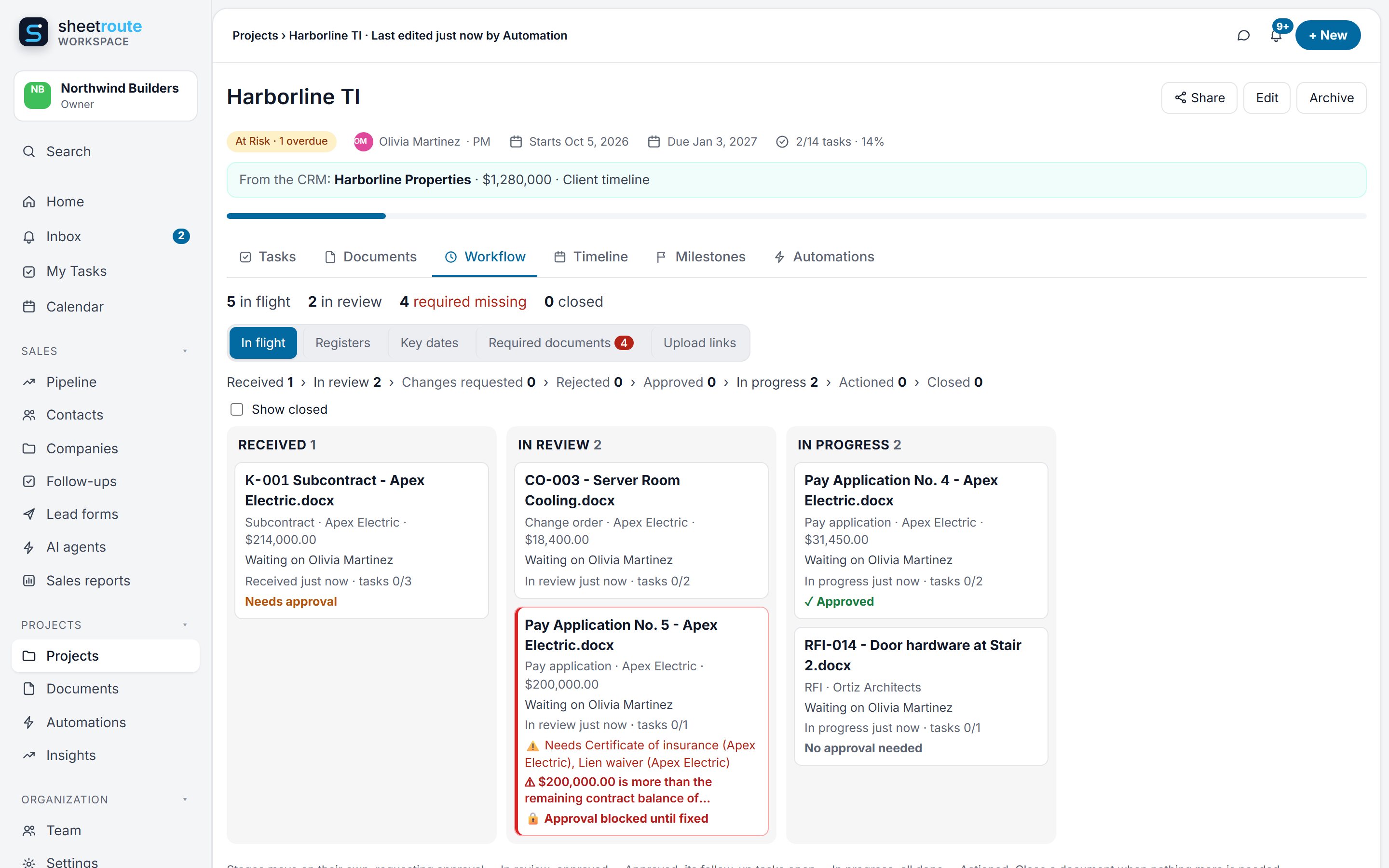
Every document tracked from arrival to done
A Workflow tab on every project: where each document is, who it’s waiting on, what it costs, what’s missing, and the logs you used to keep in Excel.
See every document’s stage, and who has it
Received, in review, changes requested, approved, in progress, actioned, closed. Documents move on their own as approvals finish and their follow-up tasks get done.
- Who it’s waiting on, and for how long
- Overdue approvals and tasks flagged
- Answers matched to questions: link the response to RFI-014 and the RFI closes
Connects to Projects: a document moves to “actioned” when its tasks in Projects are done.
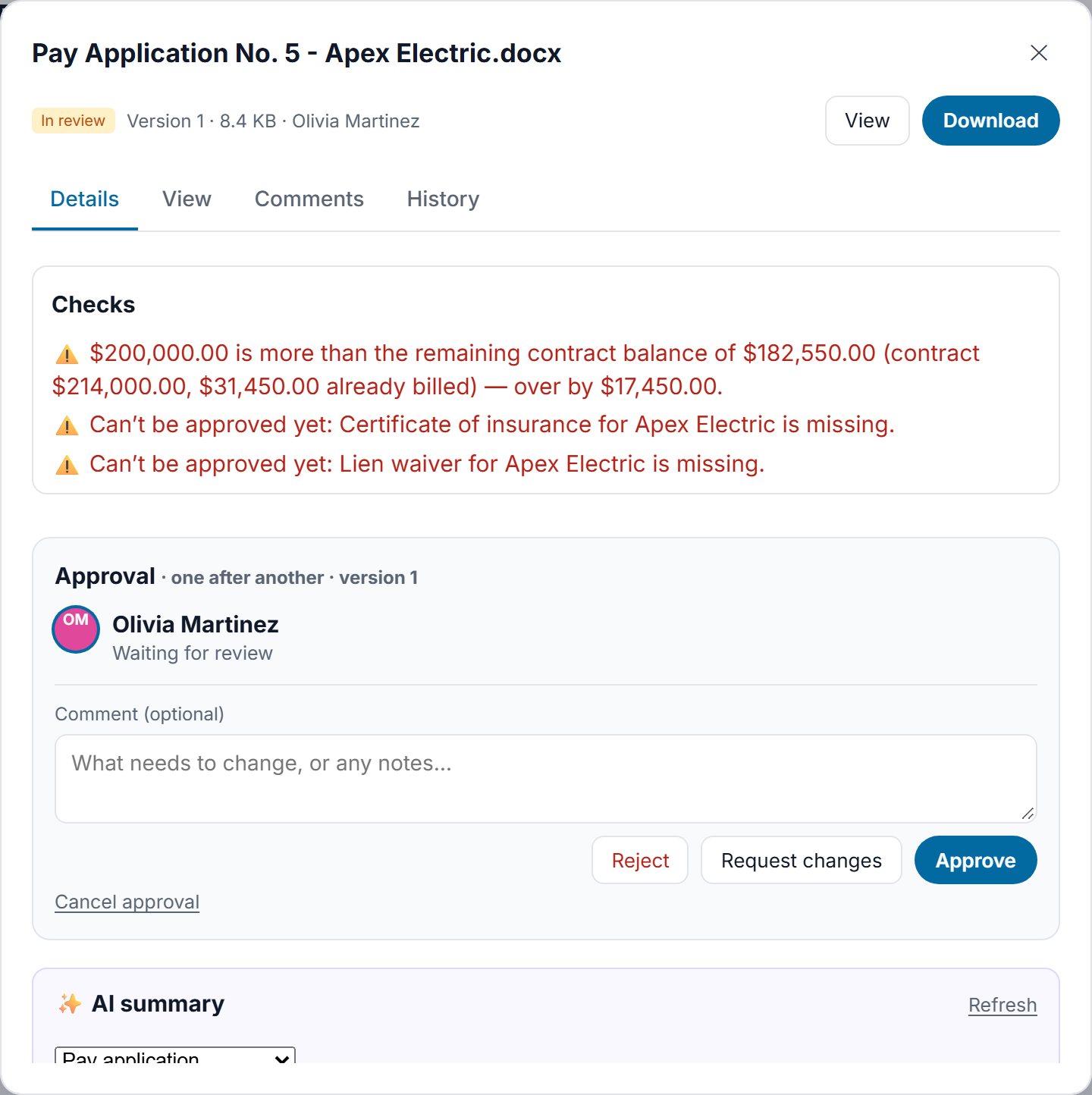
It checks the numbers before you approve
A pay application that bills more than what’s left on the contract, a lien waiver that doesn’t match its pay app, a change order that moves the contract sum: flagged on the document, before anyone signs.
- Contract balance with approved change orders
- Lien waiver amount vs. pay application
- Approval blocked while a required document is missing or expired
Connects to Projects: “verify quantities” and “process payment” tasks are created on the Harborline TI project.
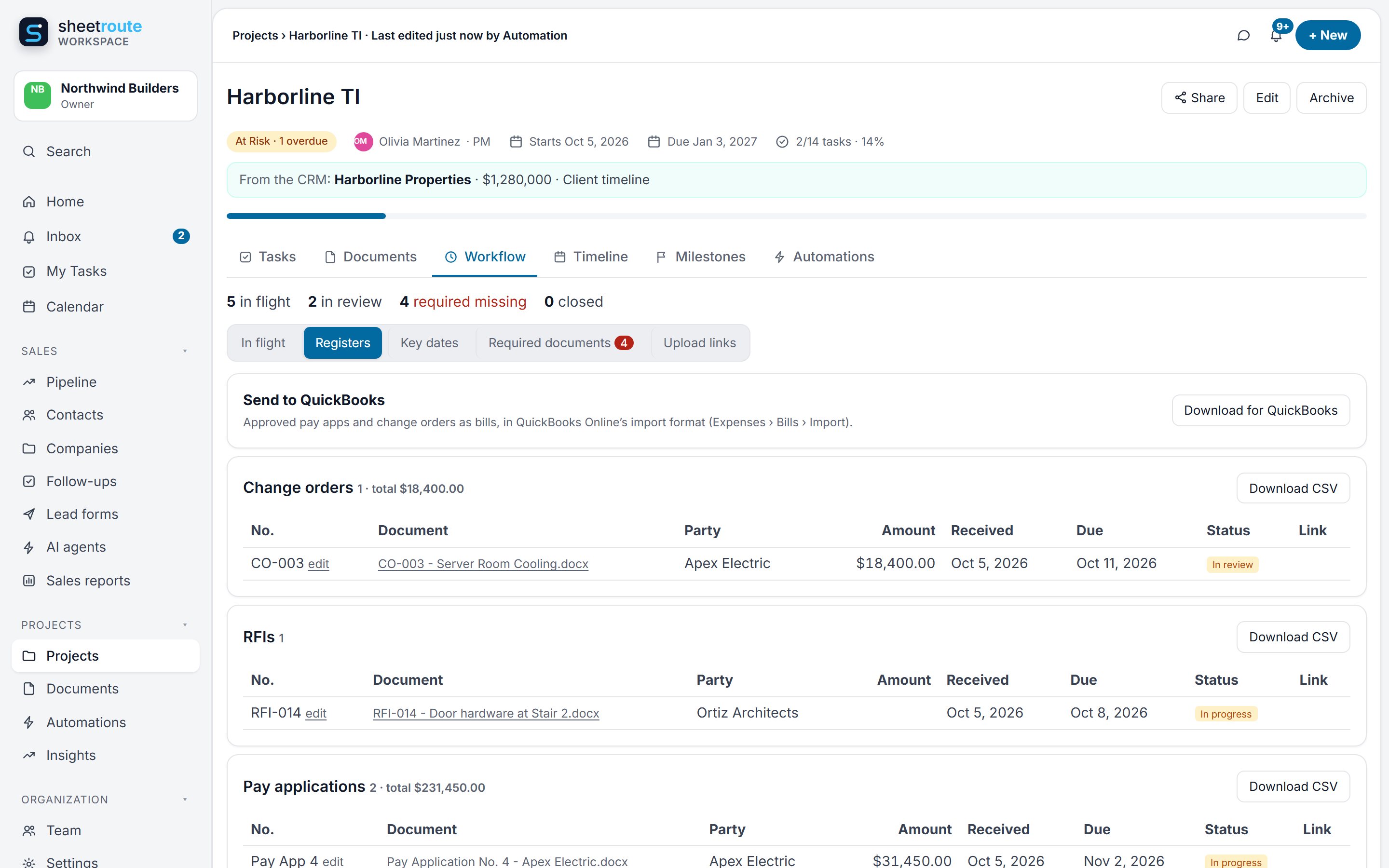
Logs that keep themselves
Change orders, RFIs, submittals, pay applications, lien waivers, notices and contracts: numbered, totaled and linked as documents arrive. Download any log for Excel.
- Uses the document’s own number, or the next one in sequence
- Duplicate numbers flagged
- Amounts, parties, due dates and status in one table
Connects to Projects: each log lives on its project, next to that project’s tasks and deadlines.
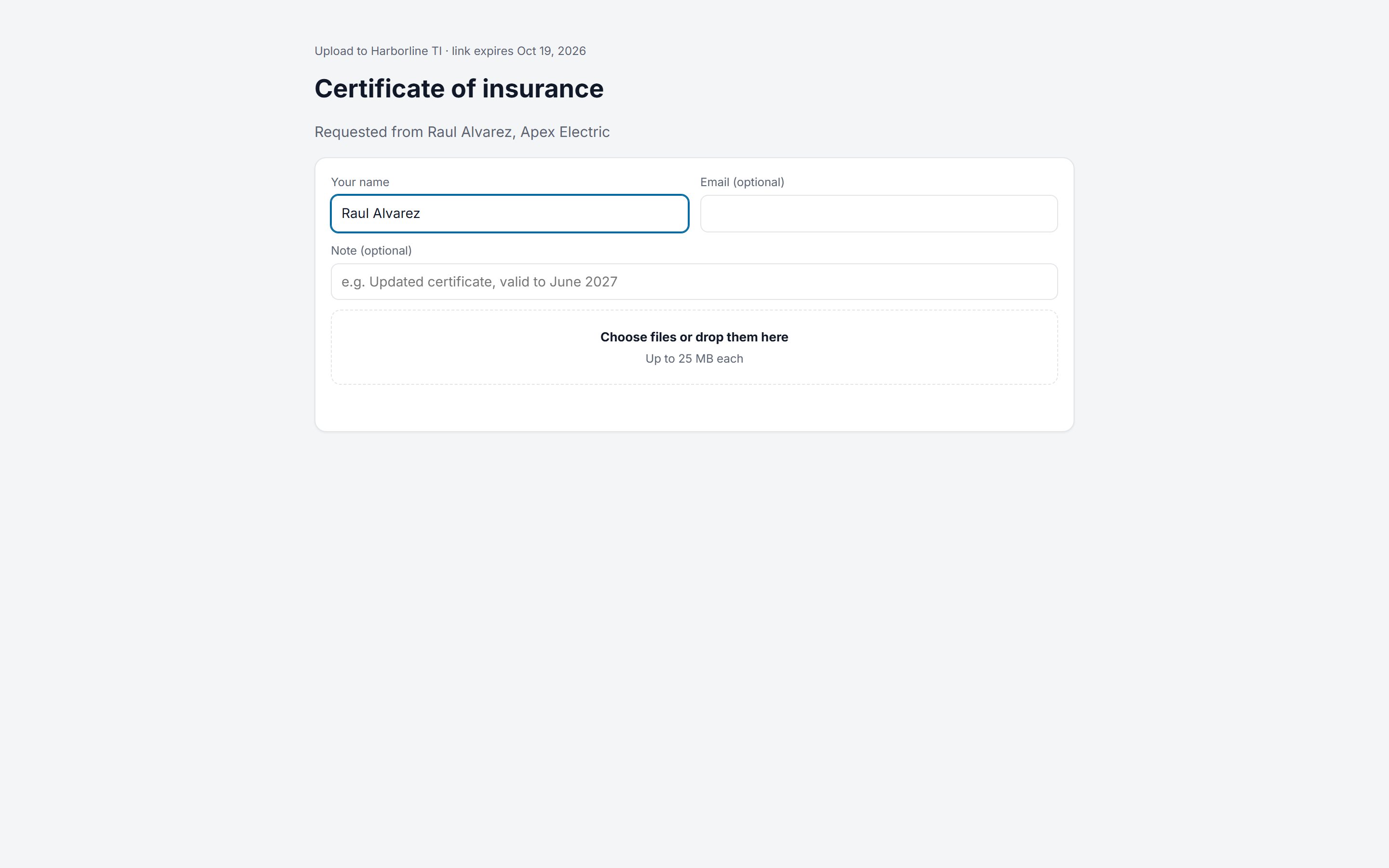
Chase paperwork with a link, not an email thread
Required documents are tracked per subcontractor. When one is missing, send a secure upload link: they upload without an account, and it’s read, filed and checked on arrival. Reviewers outside the company can approve or request changes the same way.
- Required documents per subcontractor: insurance, W-9, lien waivers
- Upload links straight into the right folder
- Outside review links: approve, reject or request changes
Connects to Projects: once Apex’s certificate arrives, the blocked pay app approval and its task move forward.
Key dates from the fine print
Response dates, notice deadlines and payment dates pulled from documents, with reminders 3 days before and on the day, listed on each project’s Workflow tab.
Tasks that cite the clause
Every task created from a document shows the exact phrase it came from, in Projects. One click opens the document.
Workflows in one sentence
“Change orders over $10,000: tell the admins and send them for approval.” Describe it and AI builds the automation for you to check.
AIA G702/G703 checks
The application and continuation sheet are read line by line: the math, lines billed past their scheduled value, and previous certificates against what you approved.
Signing links
Send a change order or subcontract to sign. They type their name and agree, without an account; the time, IP address and exact file version are recorded.
Ready for QuickBooks
Approved pay applications and change orders export as bills in QuickBooks Online’s import format, net of retainage.
Data moves between the apps so you don’t retype it
The hand-offs that save the most retyping. CRM, Projects and Documents live in one app, with one sidebar.
| When this happens | This happens automatically | Apps | Status |
|---|---|---|---|
| A lead fills in your website form | Contact, deal and a “reply today” task, assigned to the right person | CRM | Live |
| A deal is marked Won | A project is created with the client, owner and value, linked back to the deal | CRMProjects | Live |
| A contract is uploaded to a project | Key dates, obligations and contract sum extracted; tasks created that cite the clause | DocumentsProjects | Live |
| A pay application arrives | Checked against the contract balance; approval blocked if required documents are missing; follow-up tasks created | DocumentsProjects | Live |
| A project is finished (archived) | A note on the client’s timeline, a check-in task in 30 days and a repeat-work deal | ProjectsCRM | Live |
| You ask the Deal coach about a client | It reads the CRM history and looks up their projects and documents | CRMProjectsDocuments | Live |
Start with Documents. Connect everything on Business.
Simple monthly packages for your whole team. Every new organization gets 14 days of Business, free.
Free
- 3 users
- 1 app: CRM, Projects or Documents
- 3 projects, 2 GB
- 5 automations
- A small monthly AI allowance
Starter
- 5 users
- 10 GB storage
- Document management + AI extraction
- Basic workflows (20 automations)
- 100 scanned pages a month
Business
CRM, Projects and Documents, working together
- 15 users
- 100 GB storage
- Automated document workflows
- Workflow tab: registers, key dates, required documents
- Outside upload & review links
- AI tasks from documents
- CRM with lead forms and AI agents
- Approvals + AI assistant
- 1,000 scanned pages a month
Operations
CRM, Projects and Documents, working together
- 50 users
- 500 GB storage
- Unlimited automations
- Higher AI limits + premium AI
- 5,000 scanned pages a month
- Full audit history
Enterprise
- Custom users and limits
- All apps and industry packs
- Priority support and SLA
What if we use more than our plan includes?
No surprise bills. If your team uses up its monthly AI allowance or scanned pages, those two features pause until the next month or until you move up a plan; everything else keeps working. Need more users or storage? Upgrade any time, or ask us for a custom limit.
On the roadmap
Not available yet. Tell us which one matters most to you.
Questions, answered
What does SheetRoute do?
It runs the whole client journey for construction and project teams. The CRM captures leads and tracks deals, Projects runs the tasks and deadlines, and Documents reads, checks and files every contract, pay application, change order and lien waiver, then turns them into tasks, approvals and reminders.
How do the three apps work together?
They’re one app with one sidebar, one team and one sign-in. A won deal creates its project, linked to the client and the deal’s proposal documents. Tasks, key dates and required documents come straight from your contracts. The client’s CRM page lists their projects, and finishing a project puts a check-in and a repeat-work deal in your pipeline.
Do I have to use all three apps?
No. Starter is Documents only. Business and above include CRM, Projects and Documents, so you can start with documents and switch on the rest when you’re ready.
Do I have to set up workflows myself?
No. Start from ready-made templates (contracts, approvals, expiring documents, change orders, RFIs…) and SheetRoute suggests the ones you’re missing based on your own projects and documents. You can adjust any of them in plain language.
Can subcontractors or clients send and review documents?
Yes, without an account. Send an upload link and they upload straight into the project folder you choose; the document is read, filed and checked like any other. Review links let someone outside your company approve, reject or request changes, and every step is recorded in the document’s history.
What does it check before I approve?
It compares what AI read against the rest of the project: a pay application against the remaining contract balance (including approved change orders), a lien waiver against its pay application, duplicate numbers, and the documents you require on file. For example, approval of a pay application can be blocked until that subcontractor’s insurance certificate is current.
Do the AI agents change things on their own?
Only if you let them. Each agent has a mode: suggest only, ask before acting, or act automatically. In the first two, every change waits for a person to approve it, and every step an agent takes is logged.
Is there a free plan?
Yes, free for up to 3 users. New organizations also get a 14-day trial of the Business plan.
Is my data used to train AI?
No. AI runs on Amazon Bedrock, which doesn’t use your data to train models. Each organization’s data is kept separate, and admins can switch AI features on or off.
Can it read scanned documents?
Yes. Scanned PDFs and photos are read with OCR, so they’re searchable and AI can extract information from them. Monthly page limits depend on your plan.
How do people sign in?
With their Google or Microsoft account (work, school or personal). You create your organization yourself in a minute; everyone else gets in only when an admin of your organization invites them.
Tell us what slows your team down
Pay apps piling up, leads slipping through, or no clear view of where each project stands? Send a few lines and we’ll reply within one business day with how SheetRoute would handle it.
Or email hello@projectonus-delivered.com.
From first inquiry to final payment.
Start your free 14-day trial: sign in with Google or Microsoft and name your organization. You’re in within a minute.